Random Thoughts...!!!

Twitter Buzz

Showing posts with label Computers. Show all posts

3D Printing Gets a Speed Injection


Why settle for just standard SSL when VeriSign® SSL offers more robust website security? Complete website security solutions from VeriSign SSL, now from Symantec. More features. More robust website security.
The Gutenberg printing press, which was invented around A.D. 1440, truly revolutionized the world. It allowed more people to have access to books, which until that time had to be manually copied by hand. Today the world is seeing another revolutionary advance in printing technology, but this time in 3D printing.
3D Indy racing car
A racing car about 285 micrometers long printed at the Vienna University of Technology
The concept of 3D printing isn't that far removed from the traditional printing technique of basically casting ink on a page. It just adds multiple layers that build up an object in 3D. In some cases, it exists around multiple compounds that bond together to create a 3D object.
It isn't actually new -- it has existed for more than a decade. However, researchers at the Vienna University of Technology have developed a 3D printer with nanoprecision that uses two-photon lithography.

The options when buying a netbook

Acer laptop

One person's netbook might be called a laptop by someone else
What is the difference between a laptop (or to use an Americanism, a "notebook") and a netbook? It depends who you ask.
What some manufacturers call netbooks, others call laptops or even ultra-light or ultra-portable laptops.
There is no universally agreed definition in terms of size, weight, screen size or battery life.
The best you can say is that there are some portable computers that are thinner, lighter and have longer battery lives than others, and these are generally referred to as netbooks.

What is a netbook?
Netbooks are designed for basic tasks and basic internet browsing and e-mail. 

They usually come with limited processing power (up to 1.3GHz), Windows XP or Linux (Ubuntu) operating system, and no more than 80GB of storage. 

Life on the CHEAP Part II

So you want to downsize, live economically while retaining some of the comforts image your online life once held? Well the most important thing to staying online is to not be cheap when it concerns the safety of your computer. I do recommend investing in a good antivirus program. I use VIPRE Internet Security. It doesn’t slow down my computer and the customer service is OUTSTANDING!

 However if you refuse to splurge on your internet security [Rest Assured that Vipre is NOT expensive] but instead you choose a free image antivirus program like Comodo Antivirus that will keep your PC Free of All Malware, Spyware, Viruses and Trojans via its Breakthrough, patent-pending technology designed to  prevent all infections. As many of you are already ware: Comodo has designed an Award-Winning Firewall that Keeps Your Personal Information Private and Blocks unauthorized access, unknown threats, even hacker attacks.


The Law of Online Sharing

Facebook's Mark Zuckerberg will eventually have to deal with the fact that all growth has limits.

Credit: Technology Review
The idea of limitless growth gives sleepless nights to environmentalists, but not to Facebook founder Mark Zuckerberg. He espouses a law of social sharing, which predicts that every year, for the foreseeable future, the amount of information you share on the Web will double. 


Can a Court Make You Give Up Your Password?


Can the government force you to give up your password in the course of an investigation against you?
That’s the controversial debate that’s shapingimage up in U.S. District Court in Colorado. Ramona Fricosu has been charged with bank fraud and the case seemingly hinges on an encrypted computer.
Prosecutors argue that Fricosu should have to decrypt the computer, essentially giving investigators access to whatever is behind password protection. Fricosu’s attorney says that’s a violation of her right to privacy and her right against self-incrimination as protected by the Bill of Rights.
Fricosu is one of a group of people accused of bank fraud connected to a mortgage scam that targeted people facing foreclosure, allegedly to the tune of hundreds of thousands of dollars. Fricosu denies the charges. Her attorney, Philip Dubois, says that during the course of the 2010 investigation, federal authorities seized six computers from the home she shared with her then-husband, who was also named in the charges.
Authorities were able to access information in five of the computers, but haven’t been able to decrypt the sixth one, a laptop, which is protected by a hard-to-crack encryption program that’s available to the public.
Prosecutors argue that there could be key evidence on the laptop that they can’t access because they don’t know her password. They want her to provide them with it, but her attorney argues that would violate her Fifth Amendment rights, which protect an individual against self-incrimination (“no person … shall be compelled in any criminal case to be a witness against himself”).

Ultrabooks appear to be the star product category of CES 2012.

The super-thin notebook computers are being pushed by Intel as well as several of its hardware partners. Ultrabooks emphasis design, performance and a degree of affordability, but will consumers bite?
Ultrabooks will make a strong showing at this year's Consumer Electronics Show (CES), to be held in Las Vegas Jan. 10-13, with Intel (Nasdaq: INTC) and several computer vendor partners demoing products.
"The new category is already gaining momentum, with many Ultrabooks powered by second-generation Intel Core processors in the market today, and more than 60 designs already underway for 2012," Intel spokesperson Becky Emmett told TechNewsWorld.
"[Ultrabooks] are an attractive product and very portable," said Rob Enderle, principal analyst at the Enderle Group. "The intention is to push them [into the] mainstream."
"The shipment of Windows 8 ... will put tablet features into Ultrabook-like products, and tablets may become redundant," Enderle suggested.
People "don't want to carry multiple large devices," and Ultrabooks will gain tablet-like features such as touch, Enderle explained.


What's an Ultrabook? 


Intel announced the Ultrabook category at Computex in Taipei in May, and it has trademarked the term.
Ultrabooks are intended to be less than 0.8 inches (21 mm) thin and are priced at levels Intel describes as "mainstream."
The first Ultrabooks, based on second-generation Intel Core processors, nicknamed "Sandy Bridge," hit the market in 2011. Many Ultrabooks to be announced at CES 2012 will be powered by the third-generation Intel Core processor, nicknamed "Ivy Bridge." They will be availability in systems in Spring, Intel's Emmett said.
These will be followed in 2013 by Ultrabooks powered by the fourth-generation Intel Core processor, nicknamed "Haswell," Emmett stated.

To the Bridg...


IBM creates 'brain chip'

brain-cell.jpg

Computer manufacturer IBM has announced a project, which will aim to create a new chip to mimic the human brain, according to Ubergizmo.

With the help of funding from the US Defense, the company wants to create a machine which will not only learn new things, but understand them and adapt to certain situations.

Although in many ways the new chip will be a big step forwards, we shouldn't get too excited (or even scared) about the prospect of robots that are just like humans quite yet. After all, the chip is currently made up of 256 silicon neurons and the human brain can have up to one hundred billion neurons!

Via Ubergizmo.


50 Kick-Ass Websites You Need to Know About

It's time to update the entries in your browser's links toolbar. But with recent estimates putting the size of the internet at well more than 100 million distinct websites, it's getting harder and harder to get a handle on all the great stuff that's out there. That's why we've compiled this list. And unlike some lists you may have seen, which try to name the very "best" websites, but end up just telling you a lot of stuff you already know, we've chosen instead to highlight 50 of our favorite sites that fly under most people's radar. Think of it as the Maximum PC blog roll (remember those?). These sites represent great alternatives to popular web destinations like YouTube and Hulu, and include useful references, powerful web apps, and the unknown blogs you must absolutely bookmark.

Demoscene.tv

See What Can Be Done with 4 Kilobytes

top 50 websites

If you’re any kind of nerd at all, you probably know about the demoscene, where talented programmers create complex videos rendered in real-time, stored in incredibly small files. If you’re not familiar, you should make yourself acquainted with the scene, and all of the trippy, procedurally-generated content it has to offer. And hey, it’s not like you’re going to hit your bandwidth cap watching demos.

But what if you just want to see what all the fuss is about without actually downloading and running an executable? That’s where demoscene.tv comes in. Think of it as YouTube for the scene, letting you watch demos in HD on the web. And if you like what you see, the full demo executable is just a click away.

lite.Facebook.com

Clutter-Free Social Networking

You can admit it. Along with Twitter, Facebook is one of the sites that you absolutely feel compelled to check every day to keep track of your friends’ activities and latest funny links. But while we’re all for friend-stalking, we could definitely do without the AJAX-heavy sidebars and interface modules that clutter up the Facebook homepage. Try using Facebook Lite, which gives you lean views of friend feeds and your user profile. You get access to essential image and update posting functionality without being bothered by the newest Facebook game apps.

Letsplayarchive.com

Let other people play games for you

top 50 websites

The Let’s Play Archive maintains a list of hundreds of “Let’s Play” games, where somebody plays through a video game while maintaining a journal using text, screenshots and videos. Some are funny, while other’s just give you a whirlwind tour of a game you’ve never played before. Sounds dumb? Give it a try, you might just find it more engrossing than you’d imagined.

Soyouwanna.com

What They Didn’t Teach You in School


If you’ve ever needed some advice on how to do go about doing the most obscure, but didn’t really know who to turn to without receiving some sort of critical feedback, So You Wanna is a great resource for inquiring minds that think alike. So you wanna…audition for American Idol? Bottle your home-made beer? Get a travel visa to a foreign country? So You Wanna tells you all about it and assists you in your quest to become the all-knowing. Note that there is some NSFW content floating around the site.

Google Building Maker

Crowd Sourcing the 3D World

14th Century cartographers would be right about Google Earth – its world is pretty flat. Despite high-resolution satellite imagery that lets you zoom in on your neighbor’s skylight, buildings are still part of one big flat surface. That’s where you come in. Google’s Building Maker is a website that lets you help design and create buildings for Google Earth. Using a plug-in based version of their Sketch-up modeling program, you can easily create a textured 3D model of your neighborhood or local landmarks and submit them to be included in the Google Earth database. The process is surprisingly simple and really fun to use. Google has rolled out the service to 50 cities so far, but plans on expanding its reach in the future.

Ikeahacker.blogspot.com

Outsmart the Swedes at their Own Game

top 50 websites

If you’ve been a college student or 20-something living on a budget in the last couple decades, chances are good that there are a couple of bits of Ikea furniture gracing your living quarters. The Ikeahacker blog shows you how other people have transformed their old Swedish furniture into something awesome.

For More Kick Ass Websites Click: 2, 3, 4, 5, 6, 7, 8


Google is building Skype-like features into Chrome

Jun. 22, 2011 (6:05 pm) By: Alan Henry

Last month, when Microsoft bought Skype, Google execs pointed out that the only reason Microsoft got it was because Google backed out of acquiring Skype themselves at the last minute. Part of the reason that Google bailed on the talks was because they figured they could do Skype better in-house. Now it looks like they’re going to. Reports now are that Google is planning a Skype-like video and audio chat service for the Chrome browser.

Google recently released a software product called WebRTC (real time chat) as an open-source app that anyone could download, tweak, and work with. Google got the software when they acquired a company called Global IP Solutions back in 2010. Google has already pointed out that the product could be used to integrate video and audio chat into Gmail without forcing users to download a plug-in, as they do now.

At the same time though, Google isn’t stopping with Gmail. With the rapid growth of the Chrome browser and Google making a big play to get Chromebooks into the market, they want users to be be able to use video and voice chat regardless of whether they’re logged in to Gmail. According to CNet, Google wants to make WebRTC a web standard for videoconferencing, and is planning to roll it into the Chrome web browser.

If you’re worried the software will be exclusive to Chrome, don’t be. Google has already promised to keep the software open-source and royalty-free, and that they’ve engaged the Mozilla Foundation and Opera Software about including the technology with future versions of Firefox and Opera.

In the end, Google could scoop services like Skype entirely with a web application that anyone can roll into their web app or personal site. The idea is similar to services that already use Adobe Flash or JavaScipt for webcam chat, but WebRTC wouldn’t even require a plugin be installed first.


Awesome music created only from the sounds of Windows 98 and XP

May. 7, 2011 (11:02 am) By: Sal Cangeloso

This video was uploaded in 2007–so I have no idea how it escaped my attention for so long because it’s quite good. Using only audio from Windows 98 and Windows XP (Me never gets any respect…) YouTuber SomethingUnreal created the awesome track above. All the sounds were ripped directly from their respective operating system versions. They were played back in the 9 channel audio program seen in the video, obviously with lots of arranging.

During the main sections you can barely pick out any specific Windows sounds (especially the guitar-like one) but if you listen closely and focus on individuals sounds then you’ll probably recognize more than a few. If you sit through to the end you’ll see some of the sound files in isolation as they were recorded from XP and Win 98.

Using only sounds from Windows is a serious limitation for any track, but SomethingUnreal pulled this one off brilliantly. The Windows start sound in the middle strikes me a bit clunky but past that all I can say is that Microsoft needs to get thing in a Windows 8 commercial!

MSI Wind Top AE2070 All-in-One PC Released

Posted by Savvy Chick


MSI has recently unveiled a new all in one PC with the 4th generation smart touch AIO technology.  The new MSI Wind Top AE2070 comes with new smart user interface and value-added software that lets user access social networks and media with just a touch.  You can enjoy sharp and clear images through its 20-inch 1600 x 900 multi-touch LCD screen.
The MSI PC comes with a built-in Intel dual-core processor and Intel HD graphics 2000 which can further be upgraded to Intel Core™ i3 CPU or NVIDIA GeForce GT540M based on your need.
Wind Touch 4 User Interface:
The new MSI 4th generation smart touch user interface is quite helpful for those who like to surf the web and connect with social networks at the same time.  Therefore, you wouldn’t need to open a new window for accessing Facebook and Twitter.  The new Wind Touch 4 interface when connected to the Internet will automatically display the local weather and time as well.

The Wind Top AE2070 comes equipped with DDR3 2GB RAM, 500GB 7200rpm hard drive, tray-in DVD super multi optical drive, HDMI, USB 3.0, six-in-one card reader and WiFi.  It also features a 0.3megapixel webcam with microphone for internet video calling and chatting.
The AE2070 comes with an exclusive feature called Super Charger that allows users to charge any USB 3.0 compatible devices even when the computer is turned off.  Charging time is also been reduced by 40% as well.
Price of the MSI Wind Top AE2070 All-in-One PC is not yet known.

Attack of the Touch Screen Tablets

With the announcement of the release of the iPad 2 from Apple, we wanted to look back at the past year of iPad influence to see how tablet computing is changing lives, and the publishing, marketing, travel, health care, and education industries.

The WordCast Team talked about how the iPad is influencing web design on the WordCast Podcast recently, impacting the web design and developing industry and revitalizing it.

While it’s unlikely that touch screen keyboards on tablets will replace our hardware keyboards for publishing blogs and websites anytime soon, the “app mentality” has brought about a fundamental shift in how blogs and other digital content are consumed, and web developers need to be ready now.

Though all major tablets and smartphones include basic functioning web browsers, the majority of high profile web publications are providing their content to users in custom developed applications. While mobile internet access has existed for years, only recently have advanced mobile computing platforms like tablets and smartphones allowed for sensible and easy consumption of content from absolutely anywhere. Enthusiasts rave about how much they prefer flipping through blogs and newspapers on their iPad rather than firing up a computer.

As web publishers, are we coming full circle from the “hold it in your hands” and “turn the page” golden age of print? Will designers soon be thinking about finger swipes above mouse clicks? And as content continues to be relegated to specific applications, will the “surfing” style consumption of content, jumping from big sites to smaller, become a thing of the past?

How Will Tablets Change Blogging and Web Publishing?

How is the iPad and mobile technology influencing other industries? Here are some of our findings.

Health Care Industry

How the iPad is Changing Mobile Health Care – Enterprise Mobile Today

The iPad is, in some ways, a dream solution for busy doctors, nurses, and other health care professionals. It is lightweight, easy to carry, and can be used for making notes, accessing records, searching medical references, viewing medical images, and illustrating all kinds of things to patients (injuries, progressions of illnesses, surgical procedures, and even physical therapy regimes). It offers access in the office, at a hospital, at home, or anyplace else. Perhaps more importantly, its user interface is intuitive and has very little learning curve. As one doctor put it to me “within thirty seconds, you know how to use it.”

Trade Show and Marketing/Sales Industry

3 Ways the Apple iPad is Changing the Face of Tradeshows – AV Event Solutions:

The iPad can be loaded with video demonstrations of the product or service the exhibitor is offering and the sales personnel can utilize the portability and touchscreen of the iPad to go out to the masses and customize the presentation to prospect’s needs. At a point of interest, with one touch and a few clicks, the booth sales rep can email marketing materials, presentations, quotes, or contact information right to the prospect and they will have the information upon returning to the office.

Is Apple's iPad Changing CRM and Business Intelligence? — ecrmguide.com

Tim Hickernell, lead analyst for Info-Tech Research Group, sees businesses beginning to use the iPad in sales, CRM, business intelligence (BI) and marketing. In the retail segment, for instance, it allows the sales representative to accomplish order taking and inventory checks, and also gives them access to the product catalog in a rich media format. In field sales, iPads add sizzle to product demonstrations.

“Product demos incorporating 3D benefit the most from the iPad, such as medical and pharmaceutical demos in the field by sales reps,” said Hickernell. “On the CRM side, field service can log service calls, or iPads can be deployed as self-service kiosks for a variety of CRM needs.”

iPads seem to be gaining ground in high-value customer segments too. High wealth accounts such as major investors or buyers of expensive real estate can be given an iPad as a sales promotion, preloaded with an appropriate portfolio of investment opportunities and historical performance or even pre-load a high value real estate portfolio for prospective buyers, along with information about the destination city the prospect is moving to, said Hickernell.

Mind Mapping and Productivity

Mind mapping on the iPad: A game changer – Mind Mapping Software Blog

…the iPad should be a perfect platform for capturing your ideas, and then sharing them with the world.

I can foresee the iPad becoming a business tool, used to capture notes and mind maps in meetings, or to go off by yourself to a quiet spot to do some brainstorming. This exciting new device comes with a built-in microphone, which means you could capture audio notes and attach them to your mind maps (a native capability in the paid version of XMind).

The iPad may even lead us in some new directions, eventually enabling you to integrate photos you’ve shot on the iPad into your mind maps (there is no camera in the first version of the iPad, but hey – I can dream, can’t I?!). I can envision a photo of a whiteboard and capturing your meeting notes as part of a map, for example. The iPad should be a perfect platform for capturing your ideas, and then sharing them with the world.

Education

The Year of the Tablet in Education – The Xplanation

[Tablet computers] are about convergence — E-readers will not take hold in education because tablets will negate their usefulness and appeal. An e-reader is a single-use machine and a fairly limited one at that. The tablet, on the other hand, will support e-textbooks — Web-based and offline — color, Web productivity, and a whole host of other media, content creation, and communication options. The tablet can serve many functions and the e-reader only one. We want convergence when it makes sense and the convergence offered by tablet devices will appeal to educational users.

Measuring the iPad's Potential for Education — THE Journal

Making the iPad different–and perhaps more useful within the educational field–from other handheld devices, said Purdy, is the fact that it has its own software development kit. “The iPad runs on the core iPhone operating system, but it is truly a new platform with more screen real estate and more memory and storage space,” Purdy explained. “This will allow a whole new class of gaming and educational apps to come to market.”

Textbooks, for example, may look and feel very different in a just a few years, thanks in part to the introduction of the iPad. “We’ll no longer be thinking in terms of static publications and will instead be using dynamic content with animation, movies, video, and other multimedia built into it,” Purdy predicted. “We’ll go from trying to feed PDF textbooks into portable devices to building interactive, dynamic applications that students can carry around with them.”

Publishing Industry

Is Mobile Affecting When We Read? – Read It Later Blog

People are busy. It’s unrealistic that we are going to consume all of this content the exact moment we discover it. So we leave dozens of tabs open, we email ourselves links, or we use Read It Later to hold on to the content until we are ready to consume it.

…the newspaper’s portability allowed us to read in the places we found comfortable. More importantly, it let us read the day’s content on our own schedule. The iPad is doing the same.

Aside from a quick lunch hour at their desk, iPad owners are no longer doing the majority of their reading on their computers. They are saving it for their personal prime time, when they can relax comfortably, iPad in hand and burn through the content they found during the day. When a reader is given a choice about how to consume their content, a major shift in behavior occurs. They no longer consume the majority of their content during the day, on their computer. Instead they shift that content to prime time and onto a device better suited for consumption.

Initially, it appears that the devices users prefer for reading are mobile devices, most notably the iPad. It’s the iPad leading the jailbreak from consuming content in our desk chairs. As better mobile experiences become more accessible to more readers, this movement will continue to grow. Readers want to consume content in a comfortable place, on their own time and mobile devices are making it possible for readers to take control once more.

How the iPad Can Change Emergency Medicine – EP Monthly

The iPad offers a solution. Maybe it won’t happen with this specific iPad release. Maybe it won’t happen this year or next. But I expect emergency physicians will someday be able to wander through their department, moving patient to patient, with a tablet like the iPad tucked under their arms. During encounters, we’ll use iPads to tap on elements of the history or exam in, and enter orders – all very quickly at the bedside. These tablets will help us go over images and lab results with patients, and let us review diagnoses and instructions.
In short, I think the iPad can liberate doctors from the desk-based tyranny of ED information systems and the shortcomings of the paper chart.

iPad May Replace Computers and Textbooks In Schools, Expert Predicts – Cult of Mac

The iPad is going to be very big in schools, predicts Professor Mark Warschauer, one of the world’s leading experts in technology and learning. In an exclusive interview, Prof. Warschauer predicted that schools may soon start buying iPads in big numbers to replace not just desktops and laptops, but also textbooks and other reading materials.

“Until a couple of years ago, the majority of book reading — and a lot of magazine and newspaper reading — was done in print,” he said in a phone interview. “I think we’re going to see that change now.” Warschauer, a professor in the Department of Education at the University of California, Irvine, is acknowledged as one of the leading academics studying technology’s effect on education. Recently he’s been studying the effects of 1-to-1 laptop programs in education, like Maine’s ambitious Learning Technology Initiative that gave iBooks and MacBooks to all middle-school students. He said reading is likely to go digital very fast, and that many people will soon have two computing devices: a computer or laptop for writing, and a tablet for reading.

Publishing, Advertising, and Media Industries

iPads Changing Way News is Delivered – iPad News Daily

A survey by the University of Missouri suggests the iPad is opening new avenues for news outlets that could eventually have a major negative impact on print newspaper subscriptions.

…iPad users are predominantly well-educated, affluent men between the ages of 35 and 64 who tend to be early adopters, according to the study. They also tend to be very satisfied by the time spent on their iPads, with 62 percent spending more than an hour during a typical day on the device, and 90 percent spending at least 30 minutes reading news on the iPad. In addition, nearly 31 percent of iPad users surveyed said they wouldn’t subscribe to a print newspaper and 10 percent are expecting to cancel their print subscriptions, opting instead to read digital versions on the iPad.

While the numbers are very impressive, they reflect a very narrow and niche market. The reason iPad owners in general tend to be affluent can likely be attributed to the relatively high costs of a device that isn’t really considered a PC, and isn’t a traditional mobile device used for communications. The iPad is often thought of as a “tweener” device, and more of a luxury.

Tablet Computers: Changing The Way Media Feels – NPR Intern Edition

“I think we are about to enter a golden age of advertising. I think we will see much better advertising, a renaissance,” said McCambley. He’s convinced that Smartphones such as the iPhone and the Android and tablets like the iPad are so capable, they can deliver location aware advertising in any medium.

…“The ad should be almost as good as the content, or even better than the content. It should be useful to the consumer,” McCambley said. Within the iPad ad, the consumer could also find the closest location to buy the lens, do a price comparison, and read consumer reviews.

Rick Edmonds, a business media expert thinks that the newness of the tablet technology allows for a sense of exploration and excitement, but doesn’t entirely see how advertising could be more interesting than the content of a magazine like Sports Illustrated. Mixing content with advertising “has already proven a danger with some websites…the boundaries tend to be a lot looser which allows for confusion,” Edmonds said.

But McCambley remains optimistic about the future of tablets and the advertising’s role in the mix. “You’ll be able to immense yourself in your passions better than ever. Amazing content is soon to come.”

Colleges Dream of Paperless, iPad-centric – Gadget Lab | Wired.com

Bill Rankin, a professor of medieval studies at Abilene Christian, called the iPhone program the “TiVoing of education,” because the iPhone was giving students the information they need, when they want it and wherever they want it. After the success of the pilot program, the iPhone has now become a regular part of Abilene Christian’s course structure.

Rankin views the iPad as the potential sequel to Abilene Christian’s iPhone program. The university has ordered 50 iPads to kick off an iPad pilot program, which Rankin believes will focus on the future of publishing.

“This is really about people re-imagining what books look like — re-imagining something that hasn’t really been re-imagined in about 550 years,” Rankin said. “We want the students to start thinking about, what’s the best way to present information on the iPad?” said Kenneth Pybus, an assistant professor of journalism and mass communication, who serves as adviser for The Optimist. “We’re challenging them to design features that would take full advantage of photos and texts and HTML5. There’s an academic component to that — forcing students to think differently about how information is distributed and presented to readers.”

How Tablets are Changing Comic Book Reading – Ritchie's Room

After exploring the wide variety of apps in the iTunes/App Store ecosystem, the iPad had reignited my interest in the good old comic book. In fact, I’d go so far as to say that this is the future of comics, for a variety of reasons.

…The vivid experience I have when reading is what makes me very excited to re-engage with the comic book in the electronic format. It’s an amazing, dynamic environment that enhances the comic rather than takes away from it. This is because software developers have created techniques for artists to present their work in new and exciting ways.

Reading a comic in this fashion is like savouring and consuming a delicious meal, moving from dish to dish, especially if you’re a fan of the artist or writer. And you are in control of the reading pace, so it’s much more intimate and subjective than watching a cartoon or animated feature. It actually extends the reading time of a comic for me, due to the slower admiring of each panel’s finer points.

Travel and Communication

Tablets, Changing Travel Habits – GHacks

The tablets is a natural device for travel with its high entertainment focus on movies, songs, books, always on connectivity (no need to wait for the computer to boot), and light portable design. The tablet competition is already heating up, and new features like dual cameras and the ability to have video conferences on the go will ensure better response from the traveling public. Tablets provide seamless connectivity, and with large, touch-screen displays, they are a boon to use, even for the elderly. The main travel groups that use the tablet are: leisure travelers and business travelers. Though the business travel class always prefers laptops, which cater to their extensive needs, the tablet trend is catching up.

Work/Life: E-Readers and Tablets Hit the Road – Fast Company

Where tablets are concerned, the iPad’s interface is much improved. While it won’t offer the optimum e-reader features, Apple doesn’t need to sell me on the notion that the iPad will open windows for the business traveler. For example, if you’re on the road for weeks at a time, the more tasks you won’t be able to put off till you get back to the office. With an iPad you’ll actually be able to do more of those tasks. I see an iPad as bringing a part of your offices and a part of your home with you. In fact, in more ways than a laptop it will become your home away from home. This will be especially true for travelers who normally take only a handheld with them.

…Ironically, the iPad is just great except for those who work in companies that do not use Web-based corporate tools. Consequently, any applications that cannot be accessed solely over the Internet, cannot be accessed on the iPad. Many applications at my company run off our network, which uses a VPN login and software loaded on our computer. Hence there is no way my laptop could be replaced by the iPad anytime soon.

Disability and Accessibility: Freedom

Glenda Watson Hyatt - showing off new iPad at SOBCon ChicagoOne of the most powerful impacts the iPad and tablets have had is in the area of disability. As one of the most popular bloggers and social web experts, Glenda Watson-Hyatt was faced with the prospect of giving an award-winning speech. Her challenge? With her speech limited by her cerebral palsy, her options for accepting the award were also limited.

Then brilliance struck: what if I used my text-to-speech TextAloud on my computer to create the audio file and then email it as an attachment to myself on my iPad? My experiment passed the test in the lab. Would it work flawlessly live?

…then the winner’s name announced: Glenda Watson Hyatt of Soaring Eagle Communications.
I drove up in front of the stage, with my iPad on my lap. I was presented with my crystal brick award. Official photographs were taken. Then the Master of Ceremonies knelt beside me, holding a microphone next to my iPad. I tapped play and Kate spoke my acceptance speech perfectly!

Except…There was a technical difficulty with the microphone…it was not on! My brief speech was not heard. My heart sank, but I kept smiling. Once Kate had finished, the emcee kindly took my iPad up to the podium mic. Having never used an iPad before, he was able to figure out to tap play. My words were then heard.

Another door had opened for me in that moment: I had just given my first speech on my iPad!

For almost a year, Glenda has been testing and researching the iPad as an Assisted and Augmentative Communication device. She’s tested the iPad as a communication tool and to conduct an interview.

TheNextWeb contributor, Tris Hussey shared his enthusiasm for Glenda’s efforts with the iPad.

I remember my Dad showing me some of the first devices for quadriplegics help them use computers and communicate (on Apple IIs I might add), and I know if my Dad were alive now he’d be making sure his patients all had iPads. The world of computers has come a long, long way and I’m sure Glenda is going to be out there leading the charge.

Glenda and others will be inspired by this example of the life changing iPad from John Tesh:

Apple’s iPad tablet is for more than reading books and watching videos. According to the Wall Street Journal, the iPad is offering a surprising new way for special needs kids to communicate. Take two-year old Caley Gray. She’s been diagnosed with cerebral palsy, and before she got an iPad, she couldn’t answer simple “yes” or “no” questions. Now, all she has to do is touch pictures on the tablet’s screen, and special software speaks the words for her…The best part of all? Caley Gray’s mother puts it this way: She says she no longer has to fight to convince people that her daughter’s smart, even though she has cerebral palsy, because once they see her using an iPad, they know it.

Lenovo’s Monolith is an all powerful Immovable Object

review image

Want ThinkPad quality and design but don’t need the portability part of the equation? Check out an IdeaCentre all-in-one PC instead.

The B305 is an updated PC design from the company, and it’s difficult to believe that you won’t even shell out a grand for a computer this large and lovely: Featuring a 21.5-inch touchscreen, gargantuan 640-GB hard drive, 4 GB of RAM, and a 2.2-GHz Athlon II X4 CPU buttressed by ATI Radeon HD 5450 graphics. There’s Wi-Fi, Firewire, six USB ports and even an integrated TV tuner. This is a computer that will work just about anywhere: in your office, your living room or your kitchen.

Concerned about that AMD chip’s performance? Don’t be. The B305 shines under the gun, turning in numbers right in line with Intel’s mid-range Core i3 chip. It’s perfectly capable, though hardly a record-setter, with games as well, and on the whole the machine feels snappy and responsive in use.

As is often the case with retrofits like this—Lenovo’s last-generation all-in-one had a traditional LCD —the touchscreen feels like a bit of an afterthought on the B305. Touch accuracy is middling to poor and the ability to poke at the display just doesn’t add anything to the experience—in fact Lenovo’s included VeriTouch software widget is limited to locking and restarting the computer, something which is far more quickly accomplished with the mouse. Next to something like HP’s touch-centric TouchSmart PC series, the IdeaCentre offers virtually nothing for your fingertips except to nab a few extra bills from your wallet.

That said, at $949, the B305 marks a $200 price cut from its predecessor, with some impressive upgrades where they really count. We remain impressed.

WIRED More than capable, with eyebrow-arching performance. Sophisticated design and a full passel of features. Even includes the TV remote.

TIRED Touchscreen tech has taken its toll on screen brightness. No real touchscreen features built in. Concerns about tipping over (forward).

Technorati Tags: ,,

Samurai CGI shadow fighting is visually stunning

The most awesome thing you will see today is the following video shown below. Believe me. 
Called, “Sword Dance and Shadowgraph,” this live interactive and computer generated imagery performance was recently filmed in Tokyo Japan, at the The Galaxy Theater in January and was performed by Taichi Saotome.
It involves a live actor on stage armed with a Katana who is defending himself many animated shadow adversaries on the screen located behind him. The result of the fight choreography matched with the CGI presentation on the projected screen is something pretty spectacular and definitely a cool treat for the eyes to witness.

Don’t Get Caught Up in Dead Island Trailer Hype

Updated: Feb. 17, 2011; 3:15 p.m. PST

A great trailer can get you pumped for a videogame, but let’s practice some cautious optimism.

The trailer for Dead Island, scheduled to launch for Xbox 360, PlayStation 3 and PC at some point in 2011, is a riveting tease of the long-delayed zombie shooter. It may be the best videogame trailer I’ve ever seen; gorgeous, well-edited and emotionally engaging. The music is somber and the visuals are utterly harrowing. It makes the oversaturated zombie genre seem appealing again.

Only thing is, this isn’t really a game trailer in the traditional sense. It’s not a series of clips from the game. It’s a short film that takes place in the world of Dead Island.

“This trailer is meant to be illustrative of a scenario that might befall a typical vacationing family on the island,” a representative for publisher Deep Silver told Wired.com. Though the trailer is said to capture the game’s solemn tone and setting, it is not the same thing.

The trailer drummed up a lot of buzz for developer Techland, best known for the Western-themed Call of Juarez series. It’s been hyped by major pop-culture magazines and became a trending topic on Twitter.

It’s absolutely true that Dead Island could turn out to be a fantastic game, as some first-look previews are suggesting. But everyone is hyped up about a short film, not the game itself.

First and foremost, Techland didn’t make the Dead Island trailer — according to Develop, Scottish studio Axis Animation was in charge of production. Presumably the two teams worked together on the teaser, but we don’t know from whom the ideas sprung.

The game might feel nothing like what we’ve seen here. Juarez got mixed reviews, though a sequel fared somewhat better.

I’m reminded of 2007, back when Square Enix finally released a trailer for the long-delayed, highly anticipated Final Fantasy XIII. The trailer was flashy and gorgeous, hyping up even the most casual of RPG fans. Then, after several years filled with delays, the game was a resounding disappointment. The trailer gave a false impression of the game, making it seem like a project that was well-along in development when in fact it was still flailing to find a direction.

If Dead Island’s experience and emotional impact are anything close to this trailer, it could be a great game. But perhaps we should wait until we actually see the game itself before we start drawing those links.

Technorati Tags: ,

Honeycomb LG G-Slate Android 3.0 tablet to have 3-D cams, Oh MY

The LG G-Slate tablet will have 3-D cams, when it is released said T-Mobile.  T-Mobile had already stated that the the LG G-Slate would ship with the new Android 3.0 OS, also know as Honeycomb and 1GHz dual-core Tegra processor from Nvidia.

Additionally T-Mobile has revealed that The LG Slate will have an 8.9-inch screen that would be able to display 720p HD video quite smoothly.  Next interesting specification of the LG G-Slate is its dual cameras present on the rear side of the tablet.  The cameras will allow you to shoot 3-D video with its 5-megapixel lens, and the video can be played back on-screen for viewing with 3-D glasses.  You can also play back the 1080p video and 3-D video on any compatible TVs using the HDMI output.

The LG G-Slate tablet also has a front-facing 2-megapixel camera for video conferencing over 3G/4G from T-Mobile or Wi-Fi network.  Some of the other features include 32GB of internal memory, built-in gyroscope, accelerometer, adaptive lighting and flash supported web browser.  Price or availability date are yet to be announced by T-Mobile.

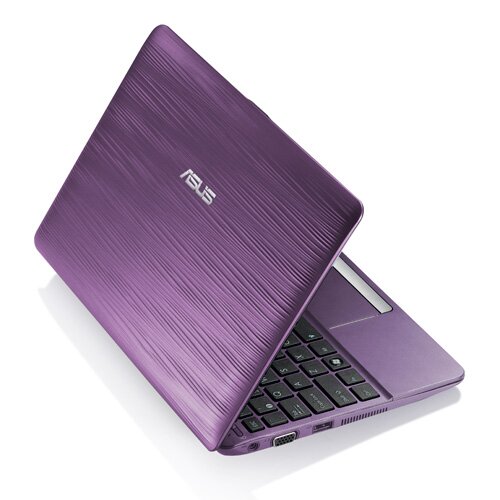
The ASUS Eee PC 1015PW netbook

The ASUS Eee PC 1015PW netbook is aimed at women – he Eee PC 1015PW  has similar specs like the Asus Eee PC1015PEM, where it features 10.1-inch LED-backlit display with 1024 x 600 pixel resolution and is powered by Intel Atom N550 1.50Ghz dual-core processor, a 250GB or 320GB of SATA hard drive with 500GB online ASUS Webstorage. Other features include a 802.11n Wi-Fi, Bluetooth 3.0, ASUS’ ExpressGate fast booting OS, “F9? Failsafe system recovery, a webcam with a camera cover, chiclet keyboard and a card reader as well as 10 hours of battery life. Price is estimated to be $700.00.

Asus Eee PC Sirocco 1015PW Purple Rain 3
Asus Eee PC Sirocco 1015PW Purple Rain 2
Asus Eee PC Sirocco 1015PW Purple Rain 1
Asus Eee PC Sirocco 1015PW Gold Dust
Asus Eee PC Sirocco 1015PW Angel Skin

Why I will always love 1984

Anya Major (born 1966) is an athlete and model who starred in Apple Computer's famous "1984" commercial, and who appeared as Nikita in the video to Elton John's song of the same name.

In 1983, the Chiat/Day advertising agency held a casting call in London, on behalf of their client, Apple Computer, for what would prove to be a landmark television commercial. The vision of the agency and director Ridley Scott stipulated an actress capable of running up to a large video screen, swinging a sledgehammer in a wide spin, and releasing it at the video screen. Unfortunately, most of the models and actresses tested could not wield the clumsy hammer, much less throw it; in fact, one errant throw nearly struck a passerby at the Hyde Park casting call. The petite Major, an experienced discus thrower who had been discovered at a local health club, won the role with her ability to handle the hammer convincingly.

The commercial aired only twice on American television, most famously just after half-time of Super Bowl XVIII on January 22, 1984. Even with this limited appearance, the ad created such a media frenzy that it gained many subsequent free TV airings and print mentions as it was discussed in the media.

Major later portrayed "Nikita" in the Elton John 1985 music video of the same name.


As a spin-off, she released a single named Moscow Nights using the name Anya.

Although Andy Hertzfeld of the Macintosh development team stated that Major had died of breast cancer in 2000, she is alive and well. She lives in

England with her husband Kim Rajah and their three children.


Technorati Tags: ,,,

The Altec Lansing inMotion Air Wireless Audio System is a great-sounding Bluetooth speaker that works with a Mac, PC or any Bluetooth-enabled music player or smartphone.

I tried it with a variety of devices, and were surprised by its stellar sound quality, not to mention its good looks. However, in our tests, its wireless range was nowhere near the 100 meters claimed by Altec Lansing for its Bluetooth dongle.

The $200 inMotion Air speaker has the easiest Bluetooth pairing routine I’ve ever seen. With one push of a button, the USB Bluetooth dongle was instantly synced up with the speaker.

After charging the speaker for about five hours, its lithium-ion battery was ready to power the system completely. The USB Bluetooth transceiver plugs into any Mac or PC, and any audio from the computer plays through the inMotion Air speaker, which behaves identically to any other USB sound output device. That includes any audio from an Internet browser, or any application that produces audio. So, I immediately went to my Pandora Radio account and it streamed through the speaker perfectly.

Connecting an iPhone and iPad were equally easy, and they all worked well with the speaker. It was a simple matter of turning on Bluetooth in the settings, and then selecting the inMotion speaker on the list of detected devices. I was also able to use my laptop’s internal Bluetooth radio to connect with the speaker.

The best aspect of this wireless audio system is its excellent sound quality. While it doesn’t have the thundering bass of my favorite wireless audio product, the $400 Sonos Wi-Fi audio system, the inMotion’s highs and midrange were sparkling and realistic, while its bass response was particularly powerful for the speaker’s diminutive form factor. Properly placed in a corner, it was able to deliver what I would call pleasant, high-fidelity sound.

Two minor gripes: I was slightly disappointed because the company says you can move the speaker 100 meters (328 feet) away from its Bluetooth dongle, but that’s apparently not the case unless you’re using it in a vacant lot. Going through one wall inside of a house, the best we could do was about 45 feet, and less than that with an iPhone and an iPad. That’s not bad, though, because it’s a whole lot farther away than we’ve been able to go with any other Bluetooth device.

The other slight problem is the inability to launch iTunes on my laptop using the remote control, something that the company says is not possible with some configurations. Unfortunately, mine was one of those. But those are small complaints, considering the inMotion’s sound quality and ease of use.

Image 2 of 14

Controls

Control your music from here, streamed wirelessly from a Mac or PC, or a Bluetooth-compatible music player or smartphone. It was easy to set up our PC, iPhone and iPad.

Front

Check out that asymmetrical shape. This is one attractive wireless speaker.


Controls

Control your music from here, streamed wirelessly from a Mac or PC, or a Bluetooth-compatible music player or smartphone. It was easy to set up our PC, iPhone and iPad.


Angular Lines

Look how the thing leans back. But it's still sturdy, even though it looks like it could tip over at any moment. And I mean that in a good way.


Back 3/4 View

The slot in the middle is a handle, and the recessed area on the right is where the remote is stowed.


Back

You can plug in its AC adapter, or it plays for seven hours on its rechargeable internal lithium ion battery.


Easy Carrying

It's light and easy to carry with its slot/handle in back.


Blue Light Peeking Through

There's a subtle blue light in the middle.


Two Speakers Inside

Those two drivers have great-sounding midrange and highs, and even though the speakers are small, the bass sounded surprisingly strong, especially when placed in a corner.


Remote Stowed Away

Here's the remote nestled in its slot...


Removing the Remote

...sliding out when you're ready to use it.


Remote

Control audio from your Mac or PC with this, and you're supposed to be able to launch your default audio program (that didn't work for my Windows 7 laptop, though). ESS is the Expanded Sound Stage technology, which does a convincing job of making it sound like the speakers are farther apart.


Crazy Remote

Even the remote has that asymmetrical theme going on.


Bluetooth Dongle

Plug this into a USB port on a Mac or PC, and it'll let stream the music about 45 feet away (that's with one wall in between).


USB

We plugged it in, and it streams music wirelessly. But the farthest away we could separate dongle and speaker without the sound breaking up was about 45 feet, far less than the 328 feet quoted by Altec Lansing.


Toshiba tablet computer with 10.1 inches screen and Honeycomb Android OS


Posted by Savvy Chick

Toshiba has recently announced the specification of its upcoming tablet, which is

expected to be another rival to Apple’s iPad.

The Toshiba tablet will have a 10.1 inch screen and weigh 1.7 pounds.  This is quite interesting because many who thought that ipad had a big screen and heavy to hold will certainly feel it hard to hold it as well.  However, the Toshiba’s tablet will certainly be very good for reading and viewing videos while on the move.

Toshiba’s tablet is also to feature the forthcoming Android OS, Honeycomb.  The Honeycomb Android OS is more optimized for tablet devices, so all the applications can take advantage of the tablet’s larger screen.  The Toshiba Tablet supports HD videos and flash videos as well.

The Toshiba Tablet will have Nvidia Tegra 2 mobile processor, WiFi, GPS, Bluetooth, USB port, SD card slot, mini USB port, 5-megapixel rear camera and 2-megapixel front camera.  Price is yet to be announced.

***
Related Posts Plugin for WordPress, Blogger...

PN

Blogger Tips and TricksLatest Tips And TricksBlogger Tricks